
Call us now :08071794348
 Send Inquiry
Multimedia Speaker System
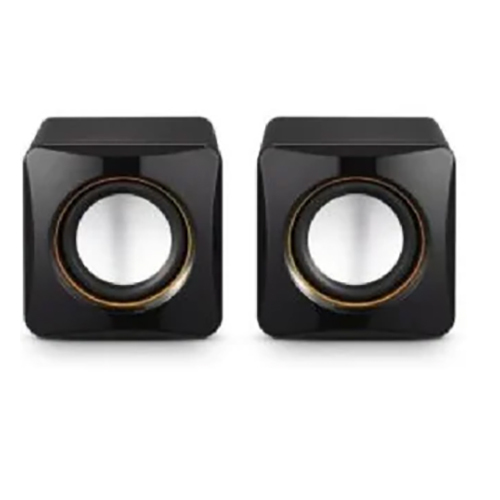

Multimedia Speaker System Specification
- Weight
- Approx. 3.25 kg
- Bluetooth
- Yes
- Monitor
- Not Included
- ODD
- Not Included
- HDD
- Not Included
- Mouse
- Not Included
- Keyboard
- Not Included
- Connectivity Options
- AUX, USB
- Warranty Period
- 1 Year Manufacturer Warranty
- Satellite Speaker
- 2 Units
- Supported Devices
- Smartphone, Tablet, PC, Laptop, TV
- Frequency Response
- 40Hz - 20kHz
- Material
- Plastic and Wood Enclosure
- Speaker Configuration
- 2.1 Channel
- FM Radio
- Built-in
- Output Power (RMS)
- 35W
- Input Voltage
- 220V AC
- Subwoofer
- Included
- Color
- Black
- Remote Control
- Yes
- LED Display
- Yes
- Impedance
- 4 Ohms
- Driver Size
- 5.25 Inches (Subwoofer)
Multimedia Speaker System Trade Information
- Minimum Order Quantity
- 5 Pieces
- Supply Ability
- 5000 Pieces Per Month
- Delivery Time
- 1-7 Days
About Multimedia Speaker System
| Scan Speed/Motion Tolerance | Up to 2.5 m/s for 13 mil UPC at optimal focus |
| Scanner Mount | Fixed Mount |
| Connectivity Type | Wired (Corded) |
| Non Operating Humidity Range | 0% to 95%RH, no condensation |
| Dimensions (L x W x H) | : (L x W x H): 85 mm x 88 mm x 139 mm |
| Dimension Excluding Feet (W x H x D) | 88mmX139mmX |
| Country of Origin | Made in India |
| Model Name/Number | HF680 |
| Scanning Technology | Omnidirectional Laser |
Dynamic Sound and Versatile Connectivity
This speaker system is built to elevate your audio experience with a dedicated subwoofer and two satellite speakers, ensuring deep lows and crisp highs. Compatible with multiple devices via AUX, USB, and Bluetooth, it caters to your entertainment needs, whether youre listening to music, watching movies, or catching up on radio broadcasts.
User-Friendly Design and Intuitive Controls
Equipped with a remote control, LED display, and easy-access buttons, this system is as easy to operate as it is enjoyable to hear. Its sleek, black wood-plastic construction not only enhances durability but also blends effortlessly into home or office interiors.
FAQs of Multimedia Speaker System:
Q: How do I connect my smartphone or laptop to the multimedia speaker system?
A: You can connect your smartphone or laptop using Bluetooth for wireless audio, or use the AUX/USB ports for wired connectivity. Simply select the corresponding input source on the speaker or remote to begin playback.Q: What are the main benefits of the 2.1 channel configuration in this speaker system?
A: The 2.1 channel setup includes two satellite speakers and a dedicated subwoofer, providing a balanced, immersive sound with strong bass and clear treble ideal for music, movies, and gaming.Q: Where can I use this speaker system effectively?
A: This system is perfect for home living rooms, bedrooms, offices, or small gatherings. Its compatibility with TVs, PCs, smartphones, and tablets makes it versatile for various environments and purposes.Q: What is the process for tuning FM radio on this system?
A: To use the built-in FM radio, switch to FM mode using the remote or control panel, then use the tuning buttons to search for and save your favorite radio stations.Q: When should I use the remote control versus the onboard controls?
A: The remote control is ideal for adjusting volume, changing tracks, tuning FM, or switching inputs from a distance. Use the onboard controls when you are near the speaker for direct input selection, playback, or power adjustments.Q: What devices are supported by this multimedia speaker system?
A: This speaker system supports smartphones, tablets, laptops, PCs, and TVs through BT, USB, or AUX input options. Please note that monitors, mouse, keyboard, ODD, and HDD are not included or supported accessories.Tell us about your requirement

Price:
Quantity
Select Unit
- 50
- 100
- 200
- 250
- 500
- 1000+
Additional detail
Mobile number
Email

More Products in Multimedia Speaker Category
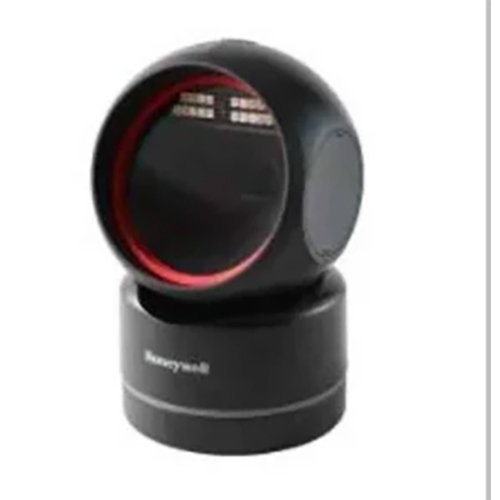
Honeywell Hf 680
Price 7500 INR / Piece
Minimum Order Quantity : 5 Pieces
Connectivity Options : Wired (Corded)

We are dealing only in bulk quantity orders.

 Send Inquiry
Our Products
- Barcode scanners
- Biometric Attendance And Access Control Machine
- Billing Software
- Fingerprint Biometric Device Aadhar UID Device
- Barcode Printers, Label Printers & Receipt Printer
- Money Counting Machine
- Electronic Consumables
- Electronic Security Accessories
- Thermal Printer And Portable Printer
- Fingerprint Scanners and Reader
- Mantra Biometric Machine
- Digital Label Printers & Finishers
- Thermal Rolls
- TVS Keyboard
- POS Products
- Electronic Printer
- Handheld Ticket Machine And Bluetooth Printer
- Mouse And Keyboards
- Visiting Card Scanner
- Printer Parts, Accessories & Supplies
- Multimedia Speaker
- Barcode Scanner Wireless Bluetooth
- Citizen Industrial Printers
- Label Print & Apply Systems
- Biometric Access Control Systems
- Attendance Recorder & Access Control System
- Security Surveillance System
- Lamination Cutting Machine
- Barcode Printer Head
- Barcode Products
- Gps Mega Device
- Mantra Adhar Enable Machine
- Mantra Time Attendance & Access Control System
- Iris Recognition System
- Erp Software Package



11, Agboatwala Building, 9, Topiwala Lane, Gr Flr,Mumbai - 400007, Maharashtra, India

Mr. Ramesh Jain
(Proprietor)
Mobile :08071794348
 Send Inquiry
 Send SMS
Developed and Managed by Infocom Network Private Limited.
